Name and Handle: a way to identify a key
Now that we have a good understanding of the different key types and their usage, let’s focus on the concepts of name and handle.
Name
Let’s start by discussing the name. Simply put, the name is a key’s unique identifier (its fingerprint). The spec states that the name is the result of the following function: \( name = nameAlg || Hash(nameAlg, publicArea) \).
In short, it is nothing more than the concatenation of a prefix (the hash algorithm that was used) and a hash.
What is the publicArea1?
It is a payload carrying public metadata about a key stored in a TPM (i.e. TPMT_PUBLIC). It is important to note that both symmetric and asymmetric keys have a publicArea.
Please find below the different fields associated with the publicArea:
| Parameter | Description |
|---|---|
| type | algorithm associated with the key (e.g. RSA, ECC, etc.) |
| nameAlg | algorithm used for computing the Name of the object (e.g. SHA256, etc.) |
| objectAttributes | attributes that, along with type, determine the manipulations of this object |
| authPolicy | optional policy for using this key |
| parameters | the algorithm or structure details |
| unique | the unique identifier of the structure. For an asymmetric key, this would be the public key |
Table: publicArea fields
Source: section 12.2.4, Part 2, v184 TPM 2.0
The important thing here is not to understand the purpose of each field but rather to keep in mind:
- that these fields are expected when creating a key
- that once created, these fields are no longer modifiable
Is the name predictable?
Not really, because when the TPM generates the private key, the client cannot know its value in advance. The client relies entirely on the TPM, and it is no surprise that the TPM2_CreatePrimary and TPM2_Create commands return the key’s name in their response.
Typically, the name is the ideal data to store in an inventory to identify a key because it is a static value.
Handle
Now, let’s discuss the notion of handle. A TPM can be seen as a heap 2 into which objects are loaded for interaction. As such, each key is associated with a memory area called a handle.
The TPM is capable of loading other types of resources but this is of little importance for now. If the topic interests you, TCG defines the addressing of objects based on their type in this document.
When created, a key is necessarily associated with a transient handle, meaning an ephemeral memory area. Indeed, if the machine reboots, the object will no longer be accessible. In practice, this is not a problem because, just like in the examples from previous pills, we can store the key on disk (i.e. TPM2B_PUBLIC/PRIVATE) and reload it later via the TPM2_Load command.
The TCG spec nevertheless provides an alternative, through another memory area called persistent handle. As its name suggests, this part of the TPM persists keys 3 (despite reboots) and is relevant when you want to avoid storing a key outside the TPM.
Please find below a representation of the two handle families:
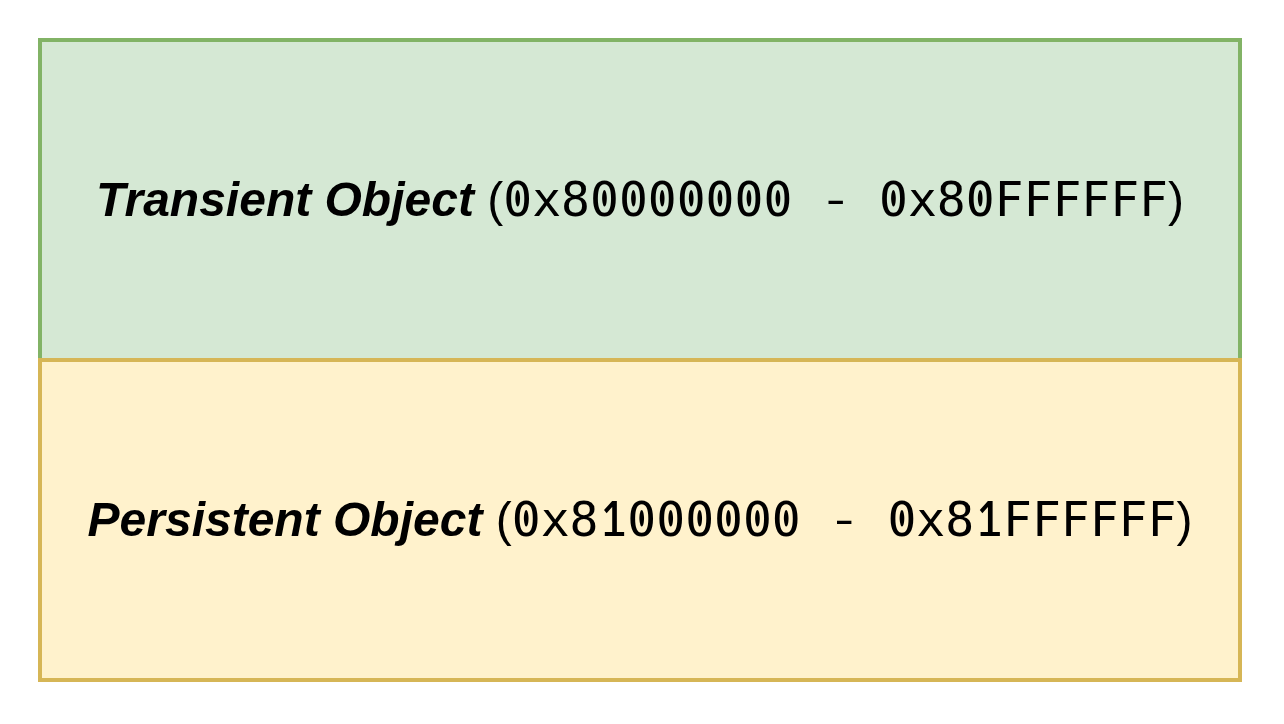
Note: The diagram shows the address range.
How does it work?
As mentioned in the preamble, a key that is created (i.e. TPM2_Create or TPM2_CreatePrimary) or loaded (i.e. TPM2_Load) into a TPM is necessarily associated with a transient handle. The TPM2_EvictControl 4 command allows persisting a key.
TPM2_EvictControl also allows removing an already persisted object, if you need to get rid of it.
Once persisted, you must use the TPM2_ReadPublic5 command instead of TPM2_Load to load a key into the TPM in order to use it.
Note: both a primary key and an ordinary key (see pill#4 for a definition) can be persisted.
Deep dive: Name + Handle = extra protection
Now, let’s spend some time looking at how the TPM uses these two concepts to improve security.
A key can be reduced to the diagram below:
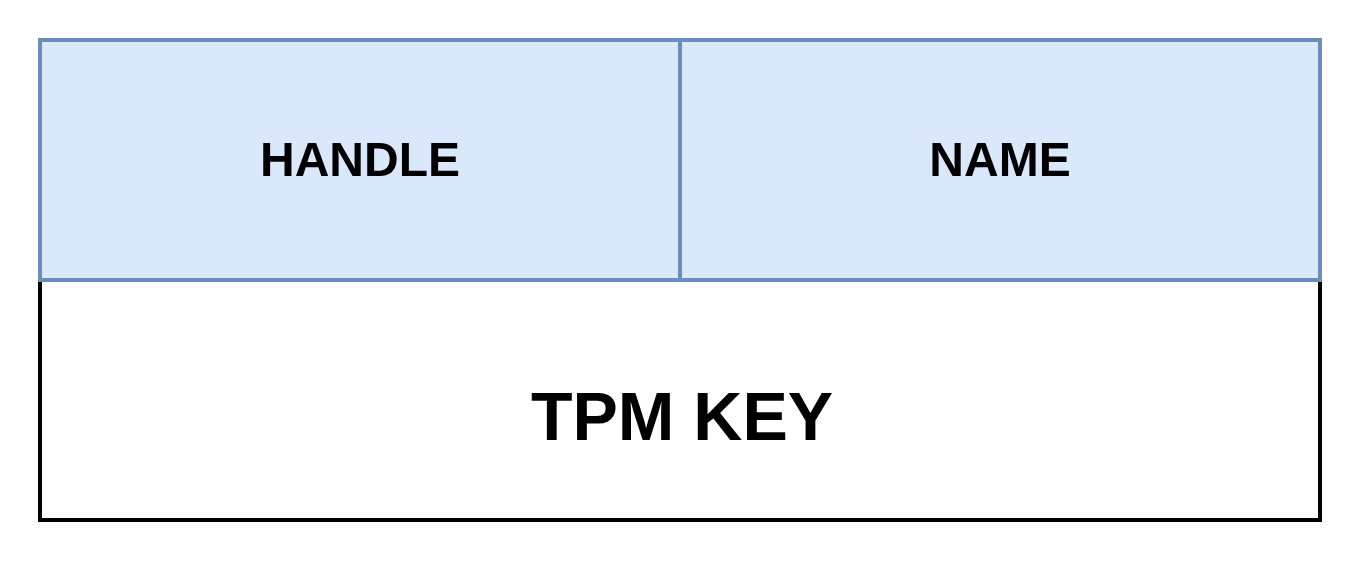
- a memory address (i.e. handle)
- a unique identifier (i.e. name)
To secure communication on the bus, the TPM allows setting up a session between the client (e.g. TPM library) and the TPM. This session enables, among other things, an integrity mechanism based on signatures. Indeed, it is possible to add a signature to a command and to a response so that the entity receiving the payload can verify its integrity and ensure that the data has not been altered during transit.
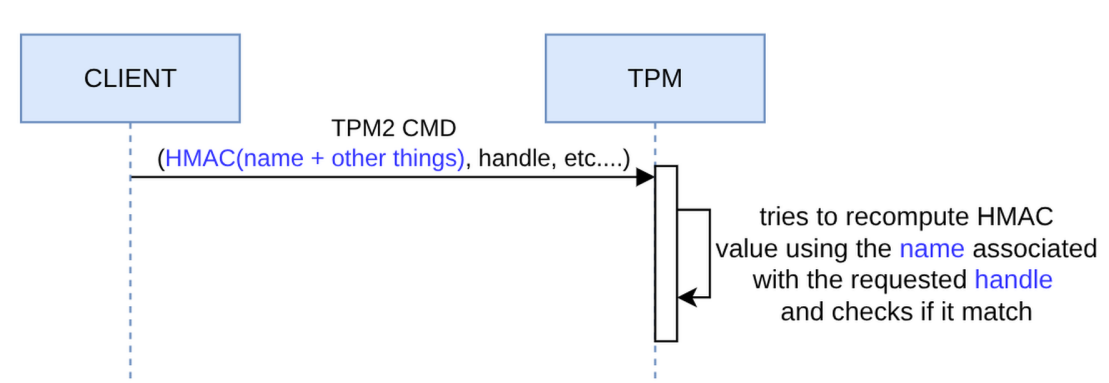
To do so, the command or response includes an HMAC (i.e. signature) that represents the object in transit. In the case of a command involving one or more keys, the name is an element of the signature. When the TPM receives the command, it loads the keys from the specified handles and computes the name to reproduce the HMAC. If the HMAC is verified, we have assurance of the authenticity of the name/handle pair binding and that we are not victims of a substitution attack.
The diagram below visually expresses what has just been discussed:
A practical example
Now that we’ve covered the main ideas, let’s get hands-on!
- Persist a key
- Load a persisted key
Persist a Key
As discussed in the previous section, to persist a key, you need to use the TPM2_EvictControl command:
evictControlCmd := tpm2.EvictControl{
	Auth: tpm2.TPMRHOwner, // indicates the hierarchy (may require authentication)
	ObjectHandle: &tpm2.NamedHandle{ // reference to the key to persist
		Handle: createKeyRsp.ObjectHandle,
		Name:   createKeyRsp.Name,
	},
	PersistentHandle: 0x81000010, // location where the key will be stored
}
evictControlRsp, _ := evictControlCmd.Execute(tpm)
To remove the key, you need to replay the TPM2_EvictControl command (I know, it’s counter-intuitive).
Load a Persisted Key
Then, the TPM2_ReadPublic command allows loading the key using its handle so it can be used:
readPubCmd := tpm2.ReadPublic{
	ObjectHandle: tpm2.TPMHandle(0x81000010), // location where the key is stored
}
readPubRsp, _ := readPubCmd.Execute(tpm)
Complete Example
To make this more concrete, this pill includes a working example that implements everything we’ve discussed so far.
The source code is available here.
Note: if you want to use a real TPM in the examples, you can add --use-real-tpm flag in each command (except cleanup).
# Create an ECC key, persist it at the given handle
# and write its public key (in PEM format) to the filesystem
go run github.com/loicsikidi/tpm-pills/examples/07-pill persist --handle 0x81000010
# output:
# Key persisted at handle 0x81000010
# Public key saved to /path/to/public.pem 🚀


# Load the key at the given handle and check if it matches the public key stored
# on the filesystem
go run github.com/loicsikidi/tpm-pills/examples/07-pill read --handle 0x81000010 \
--pubkey public.pem
# output: Persisted key at handle 0x81000010 matches the provided public key ✅

# Remove the key from the persisted handle
go run github.com/loicsikidi/tpm-pills/examples/07-pill unpersist --handle 0x81000010
# output: Key at handle 0x81000010 has been removed

# Ensure that the key has been removed as expected
go run github.com/loicsikidi/tpm-pills/examples/07-pill read --pubkey public.pem \
--handle 0x81000010
# output:
# error reading persisted key: failed to get persisted key handle: handle not
# found at address 0x81000010: TPM_RC_HANDLE (handle 1): the handle is not
# correct for the use

# Clean up
# Note: the command will remove swtpm state
go run github.com/loicsikidi/tpm-pills/examples/07-pill cleanup
# output: State cleaned successfully 🚀

# remove created file
rm -f ./public.pem
Bonus
The file 07-pill/concepts_test.go includes unit tests demonstrating some concepts that were discussed in this pill (e.g. name computation, session signature, create & createPrimary produce a key bound to a transient handle).
Conclusion
In this pill, we introduced the concept of handle, which allowed us to see that the TPM provides two memory areas, the first volatile and the second persistent. Furthermore, we saw that the name is a key’s fingerprint and that, as such, this information is used internally by the TPM to secure exchanges (i.e. signature) or externally by an application to get a unique identifier for the key.
Next Pill…
…we will focus on 4 types of keys that you MUST know about in order to effectively use a TPM.
🚧 TPM Pills is in beta 🚧
- if you encounter problems 🙏 please report them on the tpm-pills issue tracker
- if you think that
TPM Pillsshould cover a specific topic which isn’t in the roadmap, let’s initiate a discussion 💬
-
https://trustedcomputinggroup.org/wp-content/uploads/Trusted-Platform-Module-2.0-Library-Part-2-Version-184_pub.pdf#page=186 ↩
-
memory area ↩
-
and other types of objects ↩
-
https://trustedcomputinggroup.org/wp-content/uploads/Trusted-Platform-Module-2.0-Library-Part-3-Version-184_pub.pdf#page=299 ↩
-
https://trustedcomputinggroup.org/wp-content/uploads/Trusted-Platform-Module-2.0-Library-Part-3-Version-184_pub.pdf#page=74 ↩